
Most Popular Tutorials
-
 What is MySql
-
mysql query
-
mysql query example
-
what is InnoDB
-
MySql Column Type
-
DB Connection Using Function.
-
Keys
-
Select
-
Where
-
Update
-
Count No of rows
-
Alias
-
AND & OR operator
-
BETWEEN
-
Comparison Operators
-
Delete
-
DISTINCT
-
exists
-
GROUP BY
-
HAVING
-
IN
-
IS NULL & IS NOT NULL
-
LIKE
-
ORDER BY
-
LIMIT
-
SubQuery
-
TRUNCATE
-
UNION & UNION ALL
-
CONCAT
-
MySql Functions
-
Mysql Insert Id
-
MySql Join
-
TRIGGER
-
procedure
-
Transaction
-
views
-
MySql Index
-
SQL Injection
-
bind multiple Query
-
Interview Questions

what is Views?
VIEWS are virtual tables that do not store any data of its own. but display data stored in other tables. In other words, VIEWS are nothing but some SQL Queries. A view can contain all or a few rows from a table. A MySQL view can show data from one table or many tables.
In MySQL, the View is a virtual table created by a query by joining one or more tables.
the main difference between views and Tabel that the views are definitions built on top of other tables. If any changes occur in the main table, the same changes reflected in the View table also.
Syntax :
view_name: It specifies the name of the VIEW that you want to create in MySQL database.
OR REPLACE: It is optional. It is used when a VIEW already exists. If you do not specify this clause and the VIEW already exists, the CREATE VIEW statement will return an error.
How to create views in mysql?
How to show created view
Note :It is essential to know that a view does not store the data physically. When we execute the SELECT statement for the view, MySQL uses the query specified in the view's definition and produces the output.
View Example :-
INSERT INTO products VALUES('car',5, 50000), ('mabile',10, 25000);
CREATE VIEW product_view AS SELECT qty, price, qty*price AS cost FROM products;
select * from product_view;
SELECT * FROM product_view WHERE qty = 10;
Example
`id` INT(10) NOT NULL AUTO_INCREMENT,
`products_title` VARCHAR(50) NULL DEFAULT NULL COLLATE 'utf8mb4_0900_ai_ci',
`qty` INT(10) NULL DEFAULT NULL,
`price` DOUBLE NULL DEFAULT NULL,
`size` VARCHAR(50) NULL DEFAULT NULL COLLATE 'utf8mb4_0900_ai_ci',
PRIMARY KEY (`id`) USING BTREE
)
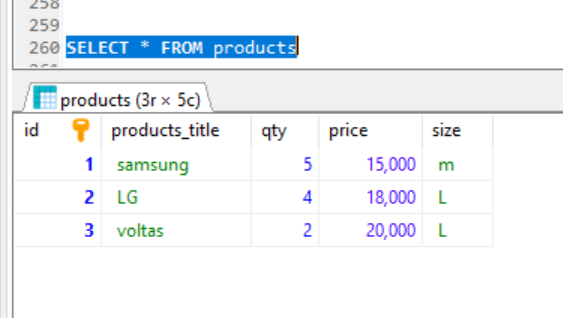
products table:
products view table:
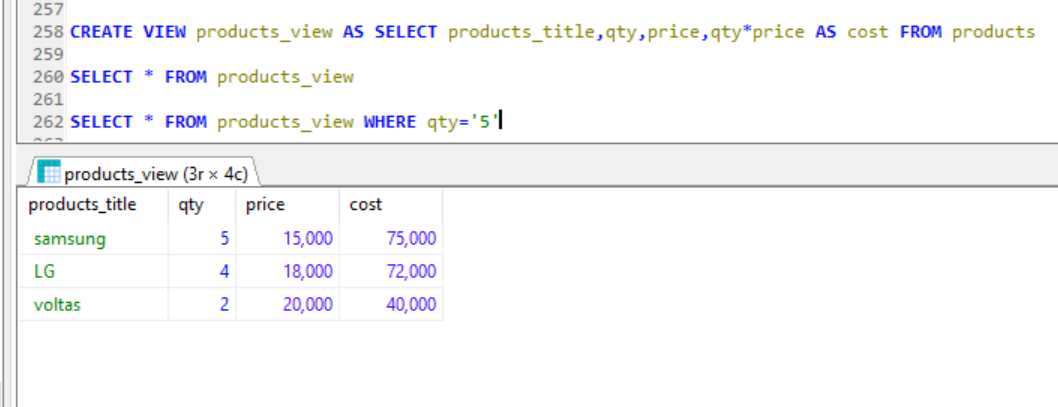
MySQL Update VIEW :
ALTER VIEW statement is used to modify or update the already created VIEW
example
Drop VIEW
DROP VIEW trainer;
Create View with JOIN Clause
AS SELECT c.course_name, c.trainer, t.email
FROM courses c, contact t
WHERE c.id = t.id;
Create View with inner JOIN Clause
SELECT emp.ID, emp.Name, emp.Salary, CAST(emp.DOB AS Date) AS DOB, emp.Gender, dept.Name AS DepartmentName
FROM Employee emp
INNER JOIN Department dept
ON emp.DepartmentID = dept.ID;
Previous Next
Trending Tutorials






0.0 / 5
0 Review
Write Review Here
Most Popular Tutorials
Important Link
-
How to manage Session in php Tutorials.
More ....... -
upcomming codeigniter and angular js tutorials.
Click here to see More ...